The SWPPP record,
built as you walk the site.
Drop pins on the plan, attach photos, and leave with an NPDES-ready SWPPP report. Routine walk or post-storm check, it comes together while you're still on site.
Trusted by the best










.png)







How it works today
When did the paperwork become the job?
A SWPPP inspection takes an hour at most. Everything after it takes the rest of the day: the report, the binder, the rain log that never stays current. It is how it has always been done, and where things quietly fall apart.
One inspector, multiple projects
A SWPPP inspector runs a stack of projects. The walk doesn't take long, but the report is where the time goes: print, three-hole-punch, file the binder, keep every rain log current.
Reports aren't actionable
The report notes what was observed and what to fix, then stops. The crew reading it can't always tell which BMP or which spot on the site it means, so the fix stalls.
BMP efficacy is a blind spot
The state, the MS4, and the stormwater manager need to see how the site's BMPs are being managed, and whether they are actually working. Today they get neither.
The SWPPP workflow
SiteMarker turns your site walk into a defensible report.
Your SWPPP and erosion control plans stay live on the map as you walk, and every pin captures its photos, location, status, and time automatically. You leave with the report done and compliant. Every corrective action is pinned to its spot, tracked to resolution, and kept on the record as proof.
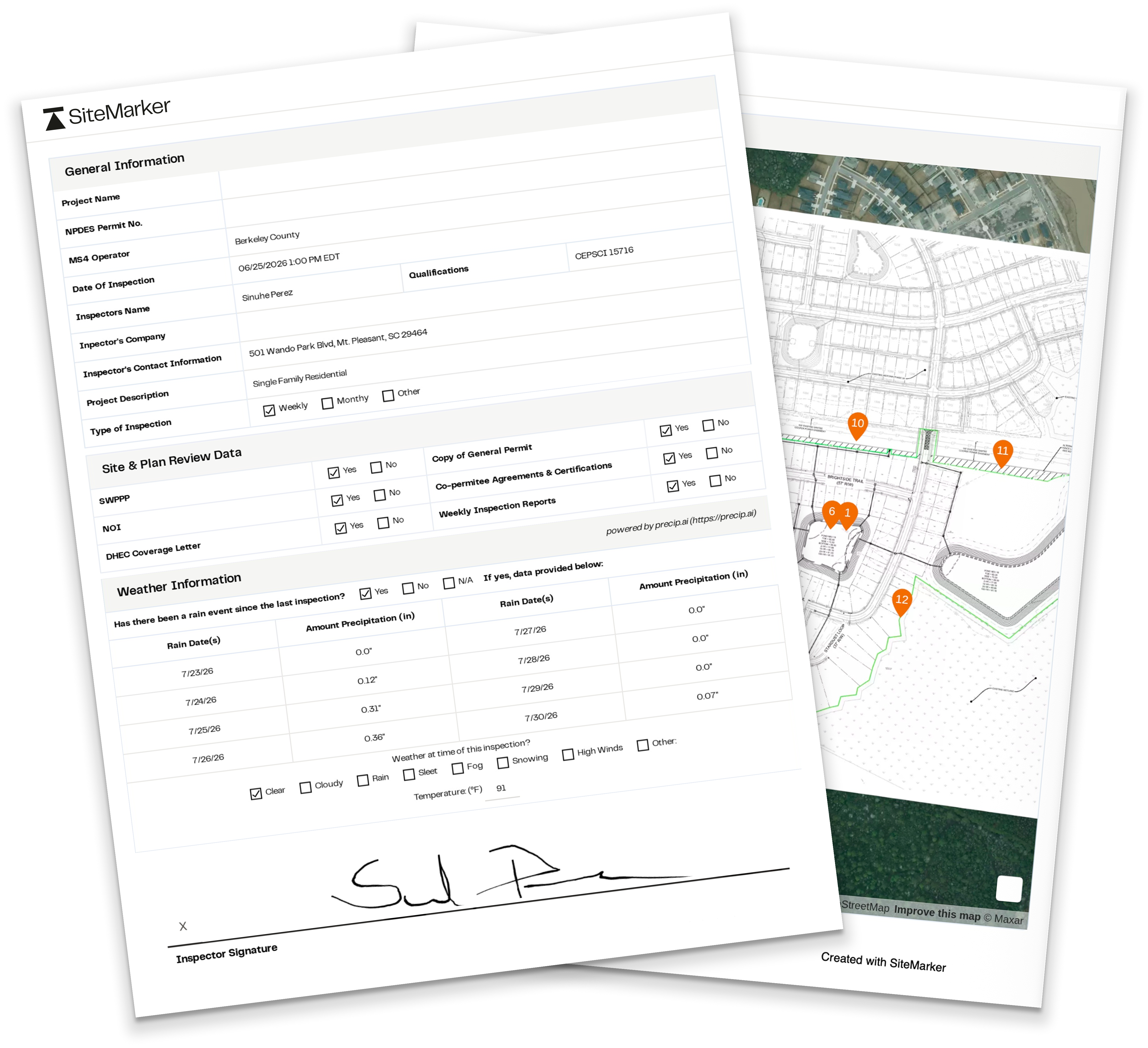
An actual SWPPP report, generated on-site
Permit & project details, captured once
NPDES permit number, MS4 operator, inspector qualifications, all filled automatically from the project, not retyped per visit.
Rain data, already in the report
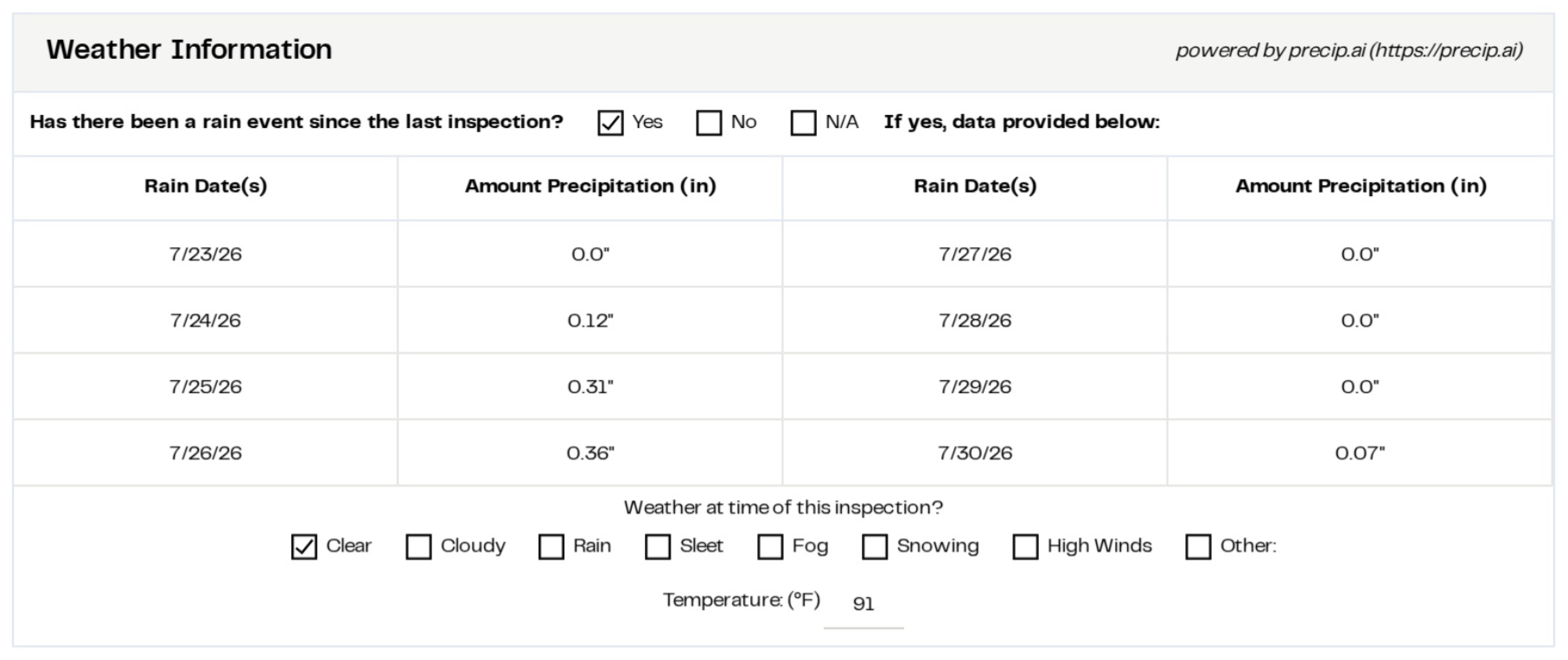
Every rain event since the last inspection is pulled in automatically from the project's coordinates.
Signed digitally
The inspector's signature is captured digitally as part of the report itself.
Every BMP, pinned to the actual plan
Every observation gets pinned to the plan as you log it, so the report already carries the exact spot it happened.
Report checklists are editable to match your county and state requirements.
Built for the walk
Every aspect of your SWPPP inspection, anchored to the plan.
Plans Loaded on the Map
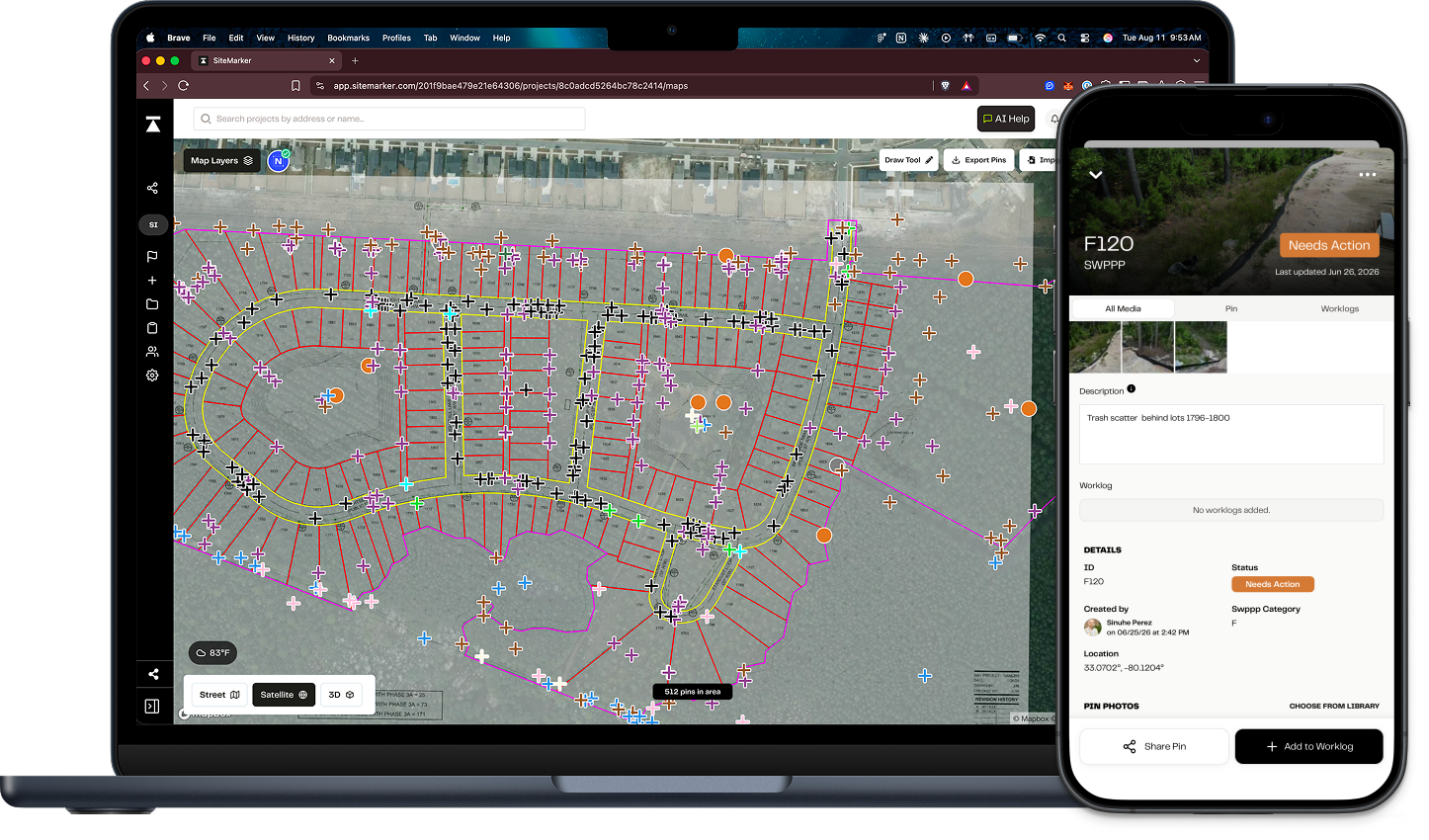
Overlay SWPPP, erosion control, and construction drawings as a live map layer. The plan moves with you as you walk.
Pin-Drop Inspections
Log a Best Management Practice (BMP), an observation, or a corrective action in seconds. Each pin carries its GPS location, timestamp, and inspector automatically.
Corrective Actions, Assigned
Push action items to the responsible contractor or consultant with the location attached. Track them to resolution without losing them in a text thread.
NPDES-Ready Reports
Generate a formatted inspection report from the field. Photos, notes, locations, and signatures organized around the elements regulators look for.
Offline-Capable
Run a full inspection with no signal at all. Everything syncs automatically once the device is back in range.
Plans Loaded on the Map
Overlay SWPPP, erosion control, and construction drawings as a live map layer. The plan moves with you as you walk.
Pin-Drop Inspections
Log a Best Management Practice (BMP), an observation, or a corrective action in seconds. Each pin carries its GPS location, timestamp, and inspector automatically.
Corrective Actions, Assigned
Push action items to the responsible contractor or consultant with the location attached. Track them to resolution without losing them in a text thread.
NPDES-Ready Reports
Generate a formatted inspection report from the field. Photos, notes, locations, and signatures organized around the elements regulators look for.
Offline-Capable
Run a full inspection with no signal at all. Everything syncs automatically once the device is back in range.
Precipitation data at your fingertips
One tap adds rain data to every report.
SiteMarker attaches hyperlocal rainfall data to every report and flags qualifying events against your permit threshold, so post-storm inspections never get missed.
 Precip
From field to record
A living record of every inspection, shared with all the stakeholders.
Members in the workspace can pull up any record, photos, notes, and pins included. The next inspector out picks up right where the last one left off.
Portable PDF reports
Every report generates as a clean PDF and syncs straight to the workspace, ready for the regulator or the binder, and it lives in your OS-SWPPP, a QR scan away on site.
Live map, shared by link
A written finding leaves the crew guessing which BMP or which corner. Send the live map link and they go straight to the pin, see the photos and what action is needed.
Unlimited users on every project
Inspector, GC, consultant, and agency reviewer all share the same map at no extra cost. Pricing is per project, never per seat.
On-site access
Digitize your On-Site SWPPP.
Put a QR sign on the site to replace the binder, and the whole project is a phone-scan away.
On site, the SWPPP reports live in a binder, and the binder takes a beating:
- Reports and plans in the binder get ruined in rain.
- Whole set needs to get reprinted whenever the plans change.
- It ends up knocked over, walked off with, or in the dumpster.
A QR sign takes the paper out of it. Scan the code and you can view the folder, with reports, plans and the rainfall log all kept current. No one drives back to the office to print, punch, and refile the binder.

In their words
Hear from the people who run SWPPP inspections every day.
Before, I would have had to try to explain the areas, 'northeast, top left side of the design plans.' Now? 'Go to pin seven, there's the issue.'

Ross Edwards
Construction Services Manager
Development Resource Group
There was an incident where they told the client they'd done the job. I went out, took a picture. Obviously it wasn't done. Having the picture time-stamped and one big work log showing how many times they said they did it when really they hadn't, it's really helpful, there's no confusion.

Sinuhe Perez
Construction Administration Field Representative
SeamonWhiteside
Why now
Stormwater oversight is expanding faster than the workforce.
Rising Permit Volume
186,000 facilities now sit under the expanded stormwater rules. In Arkansas, permits grew 512% in two years.
Aging Workforce
About 1 in 3 water-sector workers are near retirement, and the field needs roughly 10,000 new hires a year to keep pace.
Paperwork-Driven Enforcement
78% of California's stormwater enforcement in FY24/25 came from inadequate reporting and documentation, up from 44% the year before.
SWPPP Inspection FAQs
The questions inspectors, general contractors, and consultants ask before they switch.
What actually makes a SWPPP inspection record defensible?
A defensible record ties every observation to a location, a timestamp, a photo, and the person who logged it, with a clear corrective-action trail showing what was found and how it was resolved. SiteMarker captures all of that as the inspection happens, so the record stands up to a regulator, an attorney, or an internal auditor.
Will the reports satisfy our NPDES permit requirements?
Yes. Reports are organized around the elements regulators look for: BMP location, condition, photo evidence, corrective actions, dates, and inspector identification. The output is a clean PDF you can submit where your permit accepts it, attach to the project SWPPP binder, or pair with the agency's own form where one is required.
How does SiteMarker handle inspections after a qualifying rain event?
Rain-event inspections work the same way as routine ones, with rain-event-specific fields on the report. Run the walk, pin observations, document any displaced controls, log corrective actions, and the dated report is ready before you leave. There is no separate workflow to remember.
What happens if we lose cell service in the middle of an inspection?
Nothing stops. SiteMarker runs the full inspection offline: load the plan, pin BMPs, capture photos and notes, generate the report. When the device gets signal again, everything syncs automatically. Inspectors working remote sites or basement levels rely on this every day.
How is this different from a fillable SWPPP form in goCanvas, iAuditor, or a PDF?
Fillable forms digitize a paper checklist. The inspector is still typing field values disconnected from any map or spatial context. SiteMarker is map-first: every observation is pinned to the actual control on the actual plan, so location is captured automatically and the report shows exactly where each issue was found. That is the part regulators and contractors actually argue about.
How does pricing work when multiple contractors and consultants need access?
Pricing is per project with unlimited users. Inspectors, general contractors, subcontractors, consultants, and even agency reviewers can all be on the same project map without adding cost. The economics do not punish you for putting the right people on the record.